

- Pros and Cons
- Overview of GoDaddy Ecommerce
- How Easy is GoDaddy Ecommerce to Use?
- What Sales Tools and Features are on Offer?
- GoDaddy Ecommerce Customer Satisfaction
- How Good are the Theme Designs?
- GoDaddy Ecommerce Help and Support
- GoDaddy Ecommerce Pricing – is it Good Value for Money?
- GoDaddy Ecommerce Review: The Verdict
GoDaddy’s ecommerce website builder, Websites + Marketing, can help you get your online store up and running in a flash. As the name suggests, it even comes with a marketing suite to help you grow your business.
Through the use of ADI (Artificial Design Intelligence), creating a layout, uploading your products, and managing your sales has never been easier!
Pros and Cons
- The fastest and easiest product to build an online store with thanks to ADI
- Supports more industries than any of its competitors
- Great marketing tools for email campaigns and performance analysis
- Some of its features lack the quality and depth of other ecommerce platforms
- Lack of plans may limit scalability in the long run
- Limited creative control due to the use of ADI
Overview of GoDaddy Ecommerce
Ever wanted to sell online, but were worried it’d be too difficult to get an ecommerce store up and running? Think again.
GoDaddy has created a website builder that builds a site for you. No, you heard us right, it literally builds your website for you!
Through the use of ADI, a breakthrough in website design, all you have to do is answer a few simple questions about your store and GoDaddy’s product, Websites + Marketing, will do the rest.
Websites + Marketing is GoDaddy’s updated website builder, which was released in September 2019, and comes with some exciting features – especially for online sellers!
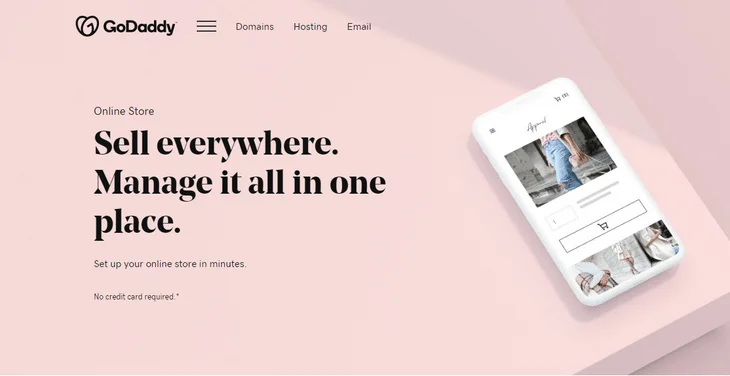
This update introduced a marketing suite, better multi-channel integrations, and GoDaddy Insight, which creates a tailored action plan for your business.
Here at Website Builder Expert, we wanted to get under GoDaddy’s skin to determine just how good it was for selling online.
We judge this by a combination of our own expert analysis and thorough testing.
We’ve analysed six areas that are crucial when creating your own online store, so we can tell you exactly how GoDaddy ecommerce stacks up in each one.
But firstly, who is GoDaddy ecommerce designed for?
If you’re a small business looking to sell a few products and need a website up fast, GoDaddy is the perfect choice.
There’s some limits to its features, though, so massive companies looking to scale globally are better off looking into the likes of Shopify or BigCommerce.
GoDaddy Review – Our overview of GoDaddy as a website builder
Shopify vs BigCommerce – Find out the key differences between two of the most powerful ecommerce products on the market today
Best Ecommerce Platforms – compare Godaddy, Shopify and Bigcommerce all in one place
How Easy is GoDaddy Ecommerce to Use?
Because of the way ADI works, GoDaddy is perfect for beginners with little to no experience of website creation.
Our thoughts on this were backed up when we ran some tests, getting everyday people to build an ecommerce store with GoDaddy before asking their opinions.
The main thing that people said was just how easy it was to get started. Here’s a direct quote:
“I thought it was good the way they start you off. There’s an introduction and a couple of menus where it teaches you how to do the theme and sort out page orders and what you want on the homepage and stuff.”
In fact, after comparing our results, GoDaddy ecommerce stood out as the easiest product to use against the competition.
GoDaddy’s on-boarding process, in particular, is strong. It will create a site for you based on your answers to its questions, then talk you through how to customize your site and add in your products.
What Sales Tools and Features are on Offer?
In general, GoDaddy has one of the widest ranging set of tools available on any ecommerce website builder.
There are so many things you can set up or be in control of, making managing your online store a relatively simple process.
It doesn’t have everything, however. You can’t sell directly across as many channels as you can on Shopify or BigCommerce, for example. Nor are GoDaddy’s features as high quality as a website builder like Squarespace – still, it’s got plenty of other merits that make it a good choice for small stores.
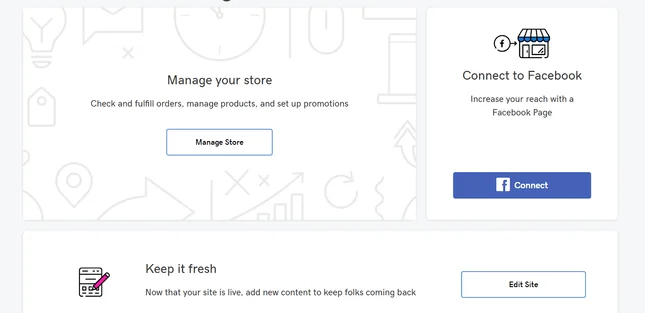
So, let’s get right down to it and find out what you can and can’t do on GoDaddy ecommerce.
Products, Management and Analytics
You can list up to 5,000 products on GoDaddy’s cheapest ecommerce plan, which costs $14.99 per month.
If you upgrade to the Commerce Plus plan, for $29.99 per month, then GoDaddy allows you to sell an unlimited amount of products.
You can also attach multiple variants to products no matter whcih plan you choose: for example, if you sell t-shirts, you can attach both size and color options.
You can also interact with customers, setting up email notifications for abandoned carts and providing your site’s shoppers with coupon codes.
Keeping tabs on your users is easy too. GoDaddy offers inbuilt customer and revenue tracking, as well as the ability to manage your stock. As part of GoDaddy’s new smart learning system, GoDaddy Insight, you also receive detailed metrics to track your store’s performance.
Looking to sell via marketplaces like Etsy, eBay and Amazon? No problem! GoDaddy’s feature Marketplaces lets you sell your products on Amazon, Etsy, Google, Instagram, Facebook, and more.
GoDaddy will manage your orders directly from your account, keeping your inventory synced in one location regardless of where your products are sold.
Payments, Transaction Fees and Shipping
GoDaddy supports some of the biggest payment processors in the world. You can choose from PayPal, Stripe and Square. You can also use GoDaddy Payments, GoDaddy’s in-house payments gateway.
GoDaddy also doesn’t charge you any transaction fees. The amount you pay for credit card transactions is directly related to the payment gateway itself, meaning, on average, you’ll be charged at the standard rate of 2.3% + $0.30 per transaction.
In terms of shipping, you can choose from a range of carriers, including USPS, UPS, and FedEx. Both GoDaddy’s ecommerce plans give you discounted USPS shipping rates.
Plus, you even get real-time shipping rates from USPS and UPS, which helps you provide accurate shipping costs for customers. This is good, because it means you won’t lose money on some orders, or overcharge customers on others!
Shopify Review – It’s rated as the best all-around ecommerce platform on the market but how good really is it?
BigCommerce Review – Have a look at our comprehensive review of one of the top online store builders
GoDaddy Ecommerce Customer Satisfaction
It’s no good just hearing about what GoDaddy can do – you want to hear from people who have actually used it! What do they think of GoDaddy? Are they happy with it?
As we’ve said, setting up an online store to begin with was one of the main things people liked about GoDaddy ecommerce in our research.
Another point that came up a lot was the amount of features GoDaddy offers. The platform gives you all those little details that can turn an ecommerce site from plain and dull to exciting and unique.
“There was so many different elements I could create. I really like the opportunity to have other things like images, a blog, or testimonials in there, where it’s been quite hard to identify that from other platforms.”
How to Build an Online Store – Our useful tips on how to turn your dream into a reality
Compare the Best Ecommerce Builders out there to find one suited to your needs
How Good are the Theme Designs?
Before you jump in and start looking around for GoDaddy’s templates, you should know you don’t actually have to pick a theme to get started.
This is because GoDaddy generates a website for you, meaning you can skip the common step in the website builder manual, where you would pick from a variety of industry-specific templates.
Still, if you want to be traditional, you can head to GoDaddy’s template library and browse its designs – of which there are over 100!

Once you’ve selected one, GoDaddy will take you to the Websites + Marketing editor so you can start creating your website. It’ll still use ADI, and check in to make sure you’ve picked a relevant industry.
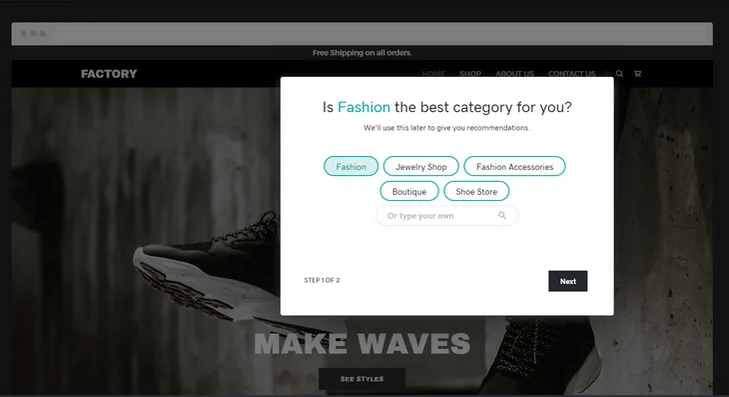
GoDaddy’s design algorithm means it can support over 1,500 different industry types.
After GoDaddy has designed your website, it gives you the option of choosing between 20 different styles in its Theme Customizer, without losing any of your content.
These come in a variety of styles and alter the layout of your website, so you can flick through before settling on a design that’s right for you.
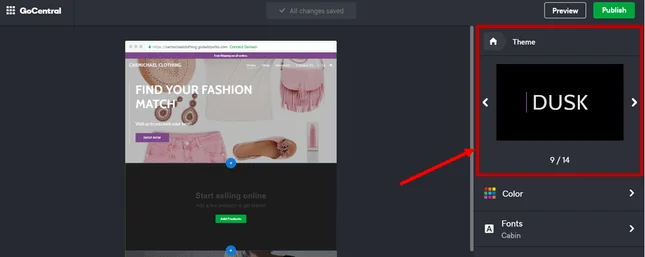
On top of that, all of GoDaddy’s themes are mobile responsive. You can see even see what your theme looks like on a smaller screen in ‘Preview’ mode.
The only thing we’d say is if you’re looking for an online store where you can just move anything, anywhere, this isn’t the product for you.
GoDaddy sticks to design best practices, which means it limits where you can and can’t put things on pages. If you need a greater level of design, take a look at Wix, which gives you total freedom to move things about to your heart’s content.
‘But what if I change my mind and want another theme somewhere down the line?’ Fear not, GoDaddy has that covered too.
You can change your choice of theme at any time. GoDaddy will automatically re-populate and reformat your products and content onto the new design.
Oh, and don’t worry: you can play around with a new design behind the scenes without it affecting what your users see, until you hit ‘Publish’.
GoDaddy Ecommerce Help and Support
GoDaddy offers ecommerce support in a variety of ways. It has a 24/7 phone line; live chat support; which tends to reply within 2 minutes or less; and a dedicated Twitter account for answering questions and queries.
Like most website builders, GoDaddy also has its own knowledge base where you can type in questions, similar to a search engine, and get immediate, helpful results.
We’d recommend, if your search results don’t match up your query, using the live chat or phone support. This is responsive and will give you up to date information.
GoDaddy’s support services are largely clear and concise. Although it doesn’t offer tons of ways for you to reach out for help, it’s still more than enough for you to get the support you need.
GoDaddy Ecommerce Pricing – is it Good Value for Money?
GoDaddy has two price plans that allow you to sell online:
- Commerce: $14.99 per month (billed annually)
- Commerce Plus: $29.99 per month (billed annually)
For new stores, we recommend the Commerce plan to start off with. This plan allows you to list up to 5,000 products on your store and sell up to 50 orders per month through marketplaces like Amazon and Etsy. It also comes with handy tools such as abandoned cart recovery and real-time shipping rates.
For growing stores with larger order numbers, the $29.99 per month Commerce Plus plan allows you to sell an unlimited number of products through your site, and sell up to 1,000 orders per month through marketplaces. In addition to all the features from the Commerce plan, you also get automated sales tax calculations and auto-populated tax forms.
All GoDaddy plans come with the option for POS (for an extra fee), and GoDaddy Payments, which is GoDaddy’s in-house payment gateway.
It’s worth noting that you should check GoDaddy’s renewal costs before signing up. The $14.99 per month Commerce plan, for example, renews at $24.99 per month after your 12-month contract is over.
While it’s great that you get such a discount for your first term, we don’t want you to face any surprises when it comes to billing later down the line!
Even taking the renewal cost into account, GoDaddy is still a very affordable ecommerce platform.
Included in this price is GoDaddy’s newest addition to its features list – GoDaddy Insight, which provides you with an Insight score comparing your site with others and a tailored action plan to help grow your business.
This is GoDaddy’s most standout feature, alongside its ADI editor, but there are still other builders that get you more bang for your buck. GoDaddy lacks some real quality to its features and apps when compared to ecommerce giants like Shopify and BigCommerce, which could stop you scaling your business.
Despite this, GoDaddy supplies you with more than enough to run a small-to-medium sized business just fine.
GoDaddy Ecommerce Review: The Verdict
With more and more website builders turning their focus towards an ADI approach, GoDaddy is well ahead of the trend.
The platform offers a great starting base to beginners, and has all the necessary features you need to run your online store smoothly and efficiently thanks to its marketing suite.
Besides being easy to use, GoDaddy is relatively cheap, and has done a lot of work on the designs it offers to make up ground on the likes of Wix and Squarespace.
GoDaddy is also the biggest domain registrar in the world, meaning choosing and connecting a killer domain name becomes a breeze.
The downside is its apps and features lack the real depth needed to scale your business to national, or even global, heights.
Another issue is the level of creative control you get. Should you want complete freedom over where things sit on your site, we’d recommend taking a look at our Wix eCommerce review.
All things considered, GoDaddy is ideal for any individual or small business that is looking to sell online and needs a website up fast.
Website Builder Expert aims to provide you with honest data. That’s why we conduct our own research and obtain direct, personal insight. Analyses and graphics in this article are based on authentic sources cross-validated by our in-house experts. We take great care to ensure the information we publish is reliable and accurate. However, WBE takes no responsibility for any inaccuracy in information supplied to us by users, research participants, or other entities.Please note the insight contained within this article is for general information purposes only. We’re glad to answer any questions you may have about this article and its supporting research. Read more here and for further information, please contact Website Builder Expert directly via email at info@websitebuilderexpert.com.
Found This Guide Helpful?
Question – Did this guide benefit you? Leave a comment below.
Do you know anyone who can benefit from this guide? Send them this page or click on the share buttons on the left.
You’ll be helping us out by spreading the word about our website, and you’ll be helping them out!


1 reply
1 reply
1 reply
1 reply
1 reply
1 reply
1 reply