






- Comparing the Best AI Website Builders
- Video Review
- 1. Wix: Best for Brand Building
- 2. Squarespace: Best AI Designs
- 3. Hostinger: Best Budget AI Builder
- 4. Shopify: Best AI Support for Online Stores
- 5. GoDaddy: Best AI Tools for Social Media
- How Do I Choose the Best AI Website Builder for My Business?
- What Is Our Methodology for Testing AI Website Builders?
- Final Verdict: Which AI Website Builder Is Best?
- FAQs
Our research found that Wix offers the best AI tools to help you get online and build your brand, including Wix Harmony (the company’s new flagship AI website builder) and an AI assistant for 24/7 support.
To help you find what’s worth your time and money, we’ve spent over 300 hours testing 12 of the top AI website builders, assessing the AI output quality and usability of their AI features.
- Wix is our top AI website builder because it offers over 20 AI tools to support your business, the highest number of any builder we tested
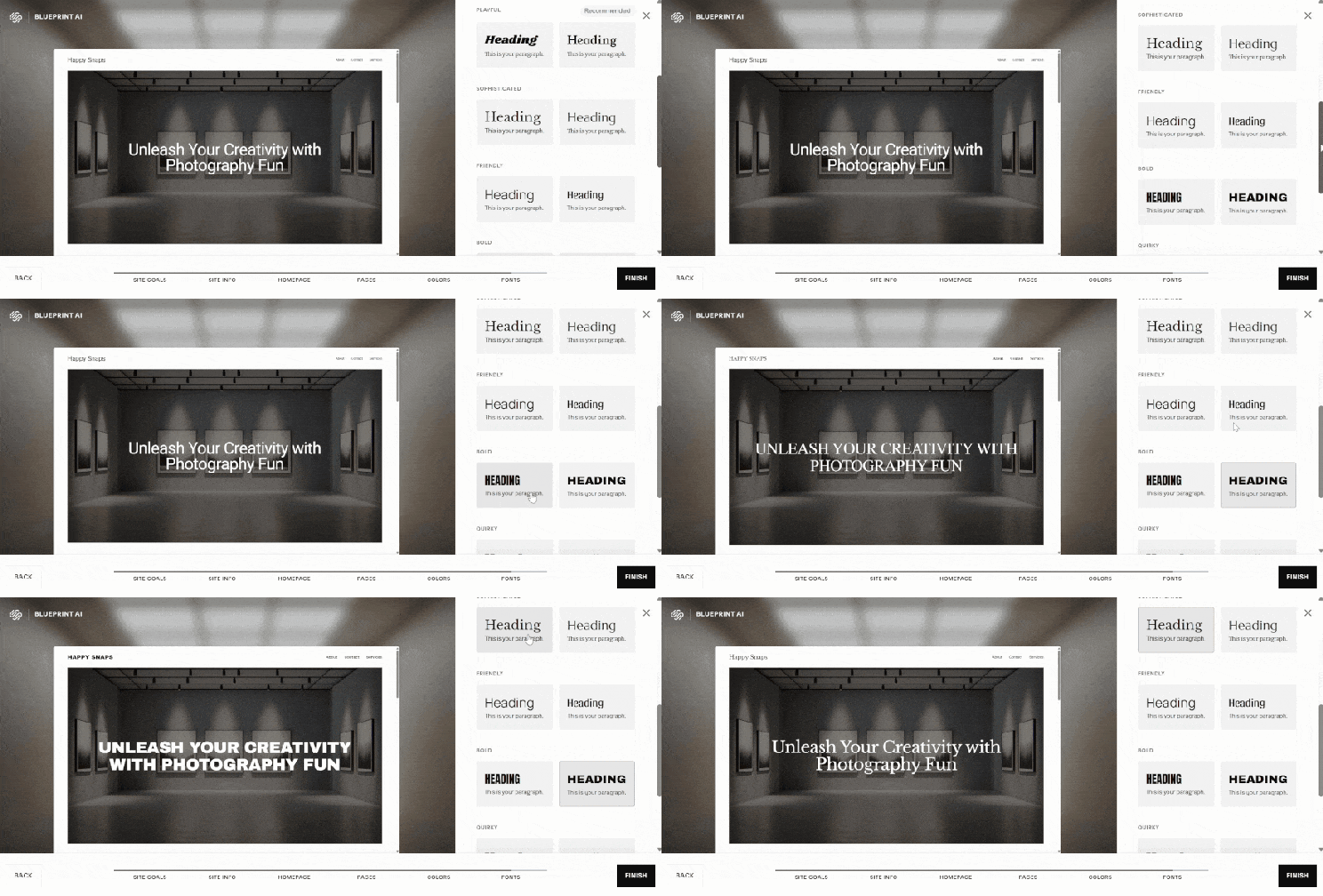
- Squarespace’s Blueprint AI Builder collaborates with you through a five-step design process before generating a high-quality template
- Hostinger is the cheapest AI website builder, starting at just $2.99 per month (for a 48-month term)
- While Shopify is pricier (starting at $29 per month), its AI guidance for store setup and growth makes it the best choice for online sellers
- You can test each builder’s AI tools with their free plans or trials, but make sure you always review any AI-generated content before publishing
At Website Builder Expert, we use an independent research process to test the best AI website builders. This involves 54 hands-on user tests and over 300 hours of data collection across six categories: design features (30%), website functionality (30%), user experience (15%), help and support (10%), pricing (10%), and reputation (5%).
I also spent time building a website with each platform’s AI tools, testing the output quality, flexibility, and responsiveness. You can read more in the methodology section of this review.
Comparing the Best AI Website Builders
Get a quick overview of our top five AI website builders in the comparison table below:
|
Overall rating
|
Today's best price
|
Free plan or free trial
|
AI features
|
Recommended for
|
||
|---|---|---|---|---|---|---|
|
Best For End-to-End AI Support
 |
 |
 |
 |
 |
||
|
Wix |
Squarespace |
Hostinger |
Shopify |
GoDaddy |
||
|
4.9
|
4.5
|
4.2
|
4.2
|
4.0
|
||
|
|
||||||
|
Free plan |
14-day free trial |
14-day free trial |
3-day free trial |
Free plan |
||
|
|
|
|
|
||
|
Businesses promoting their online presence |
Creatives, portfolios and service-based businesses |
Freelancers and budget-conscious users |
Online stores |
Tech novices and side hustlers |
Video Review
If you’re not sure which AI website builder to choose, watch our video guide for a helpful rundown:
1. Wix: Best for Brand Building
- Wix pricing: $0-$159 per month (billed annually)
- Standout AI tools: AI assistant Aria, Wix Harmony, Business Launcher
- Read our Wix review for a detailed look at the builder
Wix is our top-rated AI website builder because of its expansive range of AI features, from autonomous marketing, finance, and design assistants, to branded content generation tools that help businesses grow online.

✅ What Wix Does Well
- The conversational AI website builder uses a chatbot style to make it feel like you’re working with a professional web designer (it took roughly two minutes to respond to all of the chatbot’s queries and generate a template)
- Wix also launched Wix Harmony in 2026, combining AI, vibe coding, and drag-and-drop into a single design experience, which is great for both beginners and experienced designers
- Wix Aria is an AI-powered business assistant, available 24/7 to reduce strain on small teams by offering proactive and reactive tech, design, and marketing support from your dashboard
❌ Where Wix Could Improve
- Wix’s traditional AI website builder is becoming overshadowed by its newly released hybrid builder, Wix Harmony – so far, the two journeys exist separately, but we’ll be keeping an eye out to see if Wix Harmony becomes the default path for new websites
- The number of AI features can feel overwhelming for beginners, and Wix’s suite of AI tools continues to grow
Wix’s standard AI website builder is ideal for beginners who are happy to let AI take control when it comes to building and designing a website. Wix’s editor can be daunting to look at, because you can really do anything, so using Wix’s AI builder gives you a good foundation to start from.
And, if you need continued support, you can turn to Wix’s built-in AI tools to tweak your site’s theme, generate new layouts, and refresh your content at the click of a button.

How Much Does Wix Cost?
Wix’s pricing ranges from $17 to $159 per month (billed annually), and there’s a free forever plan. While this is a good place to start, I recommend upgrading to a paid plan to remove ads and unlock extra features, though you’ll get access to Wix’s AI tools no matter which plan you pick.
| Plan | Price with our discount TAKE10 | Monthly price (billed annually) | Monthly price (billed monthly) | Ecommerce |
|---|---|---|---|---|
| Free | $0 | $0 | $0 | No |
| Light | $15.30 | $17 | $24 | No |
| Core | $26.10 | $29 | $36 | Yes |
| Business | $35.10 | $39 | $46 | Yes |
| Business Elite | $143.10 | $159 | $172 | Yes |
2. Squarespace: Best AI Designs
- Squarespace pricing: $19-$99 per month (billed annually)
- Standout AI tools: Blueprint AI Builder, Design Intelligence, Beacon AI, AIO Scanner
- Read our Squarespace review for a detailed look at the builder
Squarespace is the best choice for AI design quality, using a structured five-step process with the Blueprint AI Builder to help generate high-end templates. There’s also a growing number of Squarespace AI tools, including an AI FAQ Composer, which helps to optimize your site for AI search engines and boost visibility.
✅ What Squarespace Does Well
- AI can keep track of your brand identity, such as key information, personality, styles, and tone of voice, to ensure your website has a cohesive design
- Beacon AI is a 24/7 business partner, offering support as you run your business, from streamlining content creation to setting up marketing automations
- The AI-powered SEO support is critical for SMBs looking to build their online presence – for example, the new AI Visibility tool helps you track site mentions across AI search results and monitor performance
❌ Where Squarespace Could Improve
- You can’t submit a detailed prompt to the AI builder, meaning you’re slightly limited to the design options provided based on your chosen business type (currently, there are 28 color schemes and 14 fonts to choose from)
- During testing, I found Squarespace’s AI-generated text output was always lengthy, though I could shorten it with the click of a button
- Squarespace needs to continue to grow its range of AI tools to compete with Wix
I’ve used the Blueprint AI Builder multiple times and, while its designs have always impressed me, there are limited customization options. You can pick and mix what you like for your site, but there’s always a risk you could end up with a similar result as someone else, so you’ll need to personalize it further in the drag-and-drop editor.
How Much Does Squarespace Cost?
Squarespace’s pricing ranges from $19 to $99 per month (billed annually), with all plans including ecommerce. You can test out the platform with Squarespace’s 14-day free trial before you commit to one of the four plans.
| Plan | Price with our discount WBE10 | Monthly price (billed annually) | Monthly price (billed monthly) | Ecommerce |
|---|---|---|---|---|
| Basic | $17.10 | $19 | $25 | Yes |
| Core | $26.10 | $29 | $39 | Yes |
| Plus | $44.10 | $49 | $65 | Yes |
| Advanced | $89.10 | $99 | $139 | Yes |
3. Hostinger: Best Budget AI Builder
- Hostinger pricing: $2.99-$7.99/month (for a 48-month term)
- Standout AI tools: AI Website Builder, Hostinger Reach, AI product generator, Kodee
- Read our Hostinger review for a detailed look at the builder
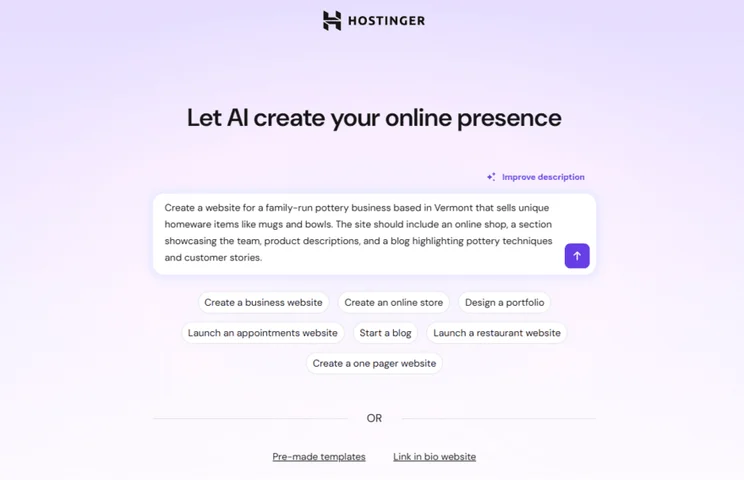
Hostinger is the best AI website builder for budget-conscious businesses, with the most expensive plan starting at just $7.99 per month (for a 48-month term). Hostinger’s features and scalability are limited in comparison to Wix, but Hostinger’s suite of AI tools help you build and manage your site at a fraction of the cost.
✅ What Hostinger Does Well
- Requesting a single prompt, the AI builder is very beginner-friendly because of its simplified approach – and, as for speed, Hostinger generated a custom template for me in less than 30 seconds
- If you’re interested in vibe coding, each plan includes AI credits – you can create websites and fully functional SaaS web apps for your business, without any coding experience
- Hostinger Reach provides AI-powered email marketing support, from generating email templates and syncing contacts to helping you manage entire campaigns
❌ Where Hostinger Could Improve
- Hostinger’s AI-generated designs are too simple, so it’s not ideal if you’re looking for advanced or sophisticated styles
- The AI image generator can be hit or miss – during one test, the image I got featured a floating head!
- Like Squarespace, Hostinger’s AI writer produced long walls of text that I needed to condense manually
The results of Hostinger’s AI website builder aren’t as strong as Wix or Squarespace, mostly because Hostinger’s AI designs feel more amateur and simple. I needed to make a lot of edits in the editor to get my site ready to publish, but it’s very easy to swap things out if necessary.
How Much Does Hostinger Cost?
Hostinger’s premium plans are incredibly affordable, but you’ll need the $3.99 per month Business plan to unlock its full suite of AI tools and ecommerce.
| Plan | Price with our discount WBE | Monthly price (48-month term) | Monthly price (billed monthly) | Ecommerce |
|---|---|---|---|---|
| Premium | $2.69 | $2.99 | $11.99 | No |
| Unlimited | $3.59 | $3.99 | $18.99 | Yes |
| Cloud Startup | $7.19 | $7.99 | $27.99 | Yes |
4. Shopify: Best AI Support for Online Stores
- Shopify pricing: $29-$299/month (billed annually)
- Standout AI tools: Shopify Sidekick, Shopify Magic, agentic commerce
- Read our Shopify review for a detailed look at the builder
Shopify’s AI product tools and AI-powered support for business owners makes the ecommerce builder a standout recommendation for online stores. For example, the built-in AI assistant, Shopify Sidekick, can help you navigate the complexities of building a brand from scratch and setting up your store, from inventory management to content ideation.
✅ What Shopify Does Well
- As of March 2026, Shopify merchants can get their products seen in AI conversations, such as ChatGPT, thanks to the Agentic Storefronts feature – this helps you meet customer demand and improve the shopping experience as users continue to use these AI channels
- Shopify Sidekick is an autonomous AI assistant which can proactively complete administrative tasks for you, such as money transfers and theme customization, as well as provide expert advice and insights based on data
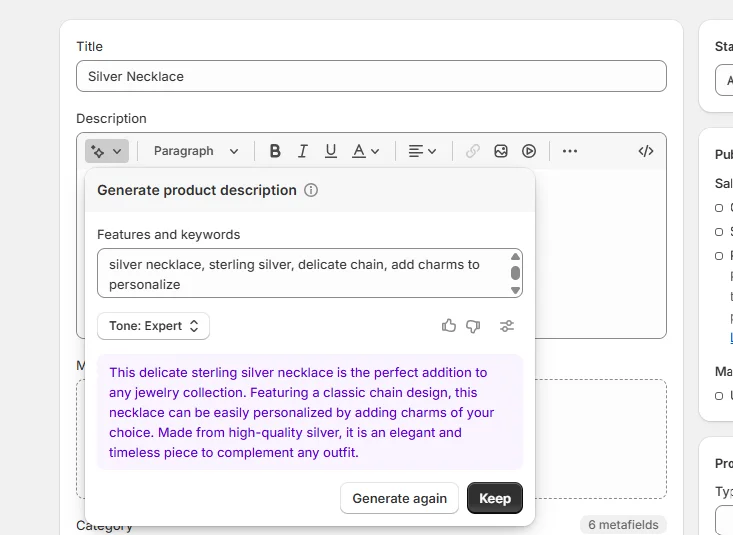
- Shopify Magic is built into the platform and encompasses a range of AI tools, supporting you with a variety of tasks, such as creating and editing images or generating product descriptions
❌ Where Shopify Could Improve
- Shopify’s AI website builder generates three themes at a time, so you may need to use different prompts to get the design you want – the onboarding process isn’t as beginner-friendly as Wix, and this AI store setup won’t be immediately obvious
- It’s hard to find all of Shopify’s AI tools – while you can look for the blue sparkle icon across the platform, some features, such as the AI Business Name Generator, aren’t clearly signposted
With Shopify, I liked the variety of styles to pick between after submitting my prompt, but I didn’t think any of the AI-generated templates were a perfect match. They lacked the personalization I could get with Wix. The copy was really the only part that aligned with my test wedding invite business, so the focus on visuals made sense given the nature of my brand, but I’d need to do a lot of tweaking in the editor.
How Much Does Shopify Cost?
Shopify’s AI website builder is more expensive, with pricing ranging from $29 to $299 per month (billed annually). That said, you can test things out with its three-day free trial, and get your first three months for just $1 per month.
| Plan | Monthly price (billed annually) | Monthly price (billed monthly) | Ecommerce |
|---|---|---|---|
| Basic | $29 | $39 | Yes |
| Grow | $79 | $105 | Yes |
| Advanced | $299 | $399 | Yes |
5. GoDaddy: Best AI Tools for Social Media
- GoDaddy pricing: $0-$99.99/month (billed annually)
- Standout AI tools: GoDaddy Airo, GoDaddy Studio, social post generator
- Read our GoDaddy review for a detailed look at the builder
GoDaddy’s low-cost Airo AI Builder is ideal for SMBs with no website building or marketing experience, especially if you’re looking to boost engagement across social media.
Not only is GoDaddy affordable, but the platform also offers multiple website building options (with Airo and traditional website builder plans), AI-powered social media features to help you generate and schedule content across channels, and built-in security measures.
✅ What GoDaddy Does Well
- GoDaddy Airo brings together AI tools to support business owners launching websites, online stores, and web apps, and you don’t need any coding experience to build with Airo
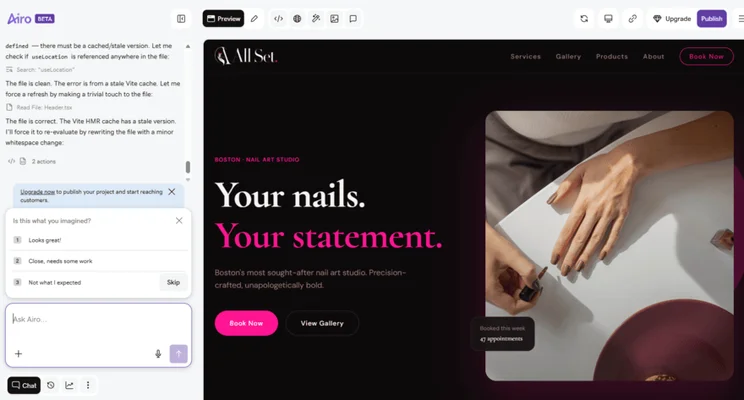
- Airo helps you get online quickly, taking a natural-language prompt and generating a custom site for you in five minutes based on real-time suggestions (the whole process feels like a conversation)
- You can use AI to create and schedule new social media content, based on AI-powered suggestions and important calendar events
❌ Where GoDaddy Could Improve
- You need to upgrade to publish your site, but you can build and customize your site for free with GoDaddy Airo (the free plan includes 50 AI credits per month)
- A custom domain isn’t included with the Airo AI Builder, but a free custom domain is included as part of GoDaddy’s traditional website builder plans
Airo let me type exactly what I wanted and the builder brought my vision to life… and then some. It took a few minutes to process my request, but the generated template was completely tailored to my prompt and Airo added elements I wouldn’t have even thought of, such as hover effects to make information stand out.
I could then use the sidebar chat to ask for changes or click on an element directly in the editor. While GoDaddy’s traditional website builder uses AI and keeps the onboarding process very simple for beginners, GoDaddy’s Airo AI Builder is even more user-friendly and customizable.
How Much Does GoDaddy Cost?
Like Wix, GoDaddy’s Airo AI Builder has a free plan. When you’re ready to upgrade or want more AI credits, pricing starts at $9.99 per month.
| Plan | Monthly price (billed annually) | Monthly price (billed monthly) | AI credits |
|---|---|---|---|
| Free | $0 | $0 | 50 AI credits/mo |
| Starter | $9.99 | $19.99 | 150 AI credits/mo |
| Professional | $24.99 | $49.99 | 300 AI credits/mo |
| Ultimate | $99.99 | $199.99 | 750 AI credits/mo |
How Do I Choose the Best AI Website Builder for My Business?
While AI-powered website building can save you a lot of time, you need to make sure your AI website builder has everything else you need too, such as email marketing, SEO tools, and dependable support.
Keep these factors in mind when choosing between our top recommendations:
- Does the website builder have the AI tools I want?
- Can these AI features reduce my business overhead?
- Does the website builder have other features I need, such as ecommerce?
- Is it easy to edit AI-generated content?
- Do the premium plans work with my budget?
- Is there 24/7 support if I encounter an issue?
What Is Our Methodology for Testing AI Website Builders?
Our in-house research team has carried out over 300 hours of testing and analysis so we can bring you accurate and up-to-date recommendations. On top of this research process, I’ve tested each of these AI website builders myself in order to share honest insights and feedback with you.
For our best AI website builder rankings, we isolated the builders that offer AI building support and adjusted the weightings of each category to focus on these AI features above other areas:
- Design features (30%): Is there flexibility when giving a prompt to an AI builder? Are there a variety of templates to choose from? Can you tweak the AI-generated theme easily?
- Website functionality (30%): How many AI tools does the builder include in your plan? Can AI support with email marketing, blogging, or selling?
- User experience (15%): Is the AI builder easy to use, or do you need to spend a lot of time refining the output?
- Help and support (10%): Does the builder offer an AI-powered assistant to help you with issues? What customer service channels are available?
- Pricing (10%): Is the AI builder good value for money? Do you need to pay more for certain AI tools?
- Reputation (5%): How does the builder compare to others in the market, and do customers trust the brand?
Customization and built-in AI support are the two most important factors, with ease of use following close behind to ensure our recommended builders can provide a strong all-around experience.
Final Verdict: Which AI Website Builder Is Best?
Based on our recent research, Wix is the best AI website builder due to its integration of 20+ AI tools, along with a robust drag-and-drop editor. You can get 24/7 support with Wix’s AI assistant, design tips within the editor, or even support with writing product descriptions.
Of course, new AI tools are being rolled out constantly, so we’ll be updating this page regularly to showcase the latest developments in the web building space.
FAQs
Yes, Wix and GoDaddy offer free plans with their AI website builders. Though these free website builders are a great way to test out the platform before paying anything, I don’t recommend staying on them forever.
Free plans include branded ads that you can’t get rid of, plus you won’t be able to access the full range of features or storage limits until you upgrade.
Yes, you own the code and content generated by AI website builders, along with the manual edits you make. However, if code has been generated to exist within your builder’s infrastructure, you can’t simply take and transfer that code to another website builder.
While it can take an AI website builder less than a minute to generate a custom website for you, that doesn’t mean your site is ready to go live instantly. You should always take the time to check and review any AI-generated content. You’ll also need to add your unique branding, update important business information, connect your custom domain, and set up your inventory (if you want to sell products).
Wix’s AI website builder can take a few minutes to go through the motions, since it typically asks you four to five questions before generating your custom template. Similarly, Squarespace’s Blueprint AI Builder is a five-step process, so it’s near impossible to get a site built in less than a minute.
For the fastest AI builder, Hostinger requests a single prompt before generating a template based on the information.


1 reply