

After our recent testing in January 2026, Bluehost is the best web host for WordPress sites. The host provides high-quality and specialized features that integrate with the WordPress ecosystem, a beginner-friendly interface, and 24/7 support. Because of these benefits, I highly recommend Bluehost for beginners and small businesses.
I’ve reviewed and analyzed Bluehost’s key features, limitations, performance, and pricing to help you decide if it’s the right web host for your site.
- Bluehost is our top web host for WordPress sites because of its optimized features and specialized WordPress support
- Pricing ranges from $3.99 to $144.19 per month (the cheapest introductory deal comes with the 36-month plan)
- Bluehost has an uptime guarantee of 99.99%, which could mean up to four minutes of downtime per month
- Beware of premium add-ons at the checkout page, including security features and SEO (from $2.99/month)
Bluehost Review: My Quick Verdict
Bluehost is officially recommended by WordPress, making it ideal for beginners and SMBs using the CMS. I was particularly impressed by Bluehost’s customer support options, specialized WordPress tools, and accessible pricing, though Bluehost lacks the long-term value of our top-rated web host, Hostinger.
To review Bluehost fairly, we put it head-to-head with its top competitors and assessed its capabilities across five core categories: performance, market analysis, pricing, features, and support.
If you’re short on time, the table below outlines the Bluehost need-to-knows:
|
Best for
|
Starting from
|
Renewal price
|
Types of hosting
|
Money-back guarantee
|
Number of sites
|
Storage space
|
Uptime guarantee
|
Server locations
|
US server response time
|
SSL certificate
|
Email accounts
|
WordPress migration
|
Automated backups
|
24/7 support
|
|
|---|---|---|---|---|---|---|---|---|---|---|---|---|---|---|---|
|
Best for WordPress sites |
|||||||||||||||
|
$3.99 |
|||||||||||||||
|
From $9.99 per month |
|||||||||||||||
|
Shared, WordPress, WooCommerce, VPS, dedicated |
|||||||||||||||
|
30 days |
|||||||||||||||
|
10 – 100 |
|||||||||||||||
|
10 – 3,000GB NVMe SSD |
|||||||||||||||
|
99.99% |
|||||||||||||||
|
USA, Canada, Germany, France, UK, Spain, India, Brazil, Australia |
|||||||||||||||
|
0.58s |
|||||||||||||||
|
Free |
|||||||||||||||
|
1 month free trial (then $2.99/month) |
|||||||||||||||
|
Free |
|||||||||||||||
|
Weekly |
|||||||||||||||
|
Live chat, phone |
|||||||||||||||
| Visit Bluehost |
- We tested 8 leading web hosting providers in 2026
- Our research looks at 5 core categories: performance, market analysis, price, features, and support
- We use human experts to write our reviews and recommendations
How Much Does Bluehost Cost?

Bluehost’s pricing starts at $3.99 per month for its Starter shared hosting plan. The cheapest introductory deals, across all hosting types, are for a 36-month term. But, if you’re not ready to commit to a long subscription, Bluehost’s hosting plans are also available for 12-month or monthly contracts instead.
You can see a full breakdown of starting prices and renewal fees for each hosting type below:
| Cheapest plan | Starting price (36-month term) | Renewal price (36-month term) | Starting price (12-month term) | Renewal price (12-month term) |
| Shared hosting (Starter) | $3.99 per month | $9.99 per month | $4.99 per month | $11.99 per month |
| WordPress hosting (Starter) | $3.99 per month | $9.99 per month | $4.99 per month | $11.99 per month |
| WooCommerce hosting (eCommerce Essentials) | $14.99 per month | $21.99 per month | $16.99 per month | $24.99 per month |
| VPS hosting (NVME 2) | $4.99 per month | $4.99 per month | $4.99 per month | $4.99 per month |
| Dedicated hosting (Standard NVME 32) | $144.19 per month | $191.79 per month | $157.79 per month | $195.32 per month |
Bluehost also offers a 30-day money-back guarantee (which is pretty standard in the industry), meaning it’s fairly risk-free to get started with the web host.
Building a website and maintaining it can be a costly process, with 13% of SMBs allocating over 41% of their monthly revenue to operating expenses. To reduce your hosting spend, consider the following tips:
- Choose a longer subscription – while you’ll be locked into a contract for a few years, you’ll pay less each month if you opt for a 36-month subscription
- Only pay for what you need – a personal WordPress website won’t need the power and features of a dedicated hosting plan, so choose the right plan to start
- Some optional add-ons are essential – for example, Bluehost recommends you add Sitelock Essentials, Codeguard, and Yoast (with each costing an extra $2.99/month) to your plans. These will increase your monthly outgoings, but the added security and SEO features are critical for a successful site
- Budget for renewal fees – introductory deals don’t last forever, so make sure you can afford your hosting plan once the renewal fees kick in (for example, the $3.99 per month Starter plan will cost $9.99 per month)
What’s Included With Bluehost?
Bluehost’s hosting plans offer built-in tools to support performance, scalability, and security, such as weekly malware scans, a free SSL certificate, and global data centers. In fact, based on our testing, Bluehost has the best hosting features in 2026.
And, given that Bluehost is WordPress’ recommended provider, all plans support CMS and include specialized features, such as free site migration and WordPress updates.
| Hosting Type | Shared | WordPress | WooCommerce | VPS | Dedicated |
| Websites | 10-100 | 10-100 | 100 | Unlimited | Unlimited |
| Storage | 10-100GB | 10-100GB | 100GB | 50-450GB | 1,000-3,000GB |
| Monthly Visits | 40-400k | 40-400k | 400k | 400k+ | 400k+ |
| CPU Cores | / | / | / | 1-8 | 8-32 |
| RAM | / | / | / | 2-16GB | 32-128GB |
In addition to the storage and power limits, depending on the hosting type and plan, every Bluehost plan includes:
- cPanel
- Unlimited bandwidth
- Built-in security measures (which I’ll discuss more later)
- Free domain name for the 1st year
- Free SSL certificate
- Free professional email (one month trial)
- AI site creation tools
- Free CDN
- Yoast SEO
As you upgrade your plan or switch to a more powerful hosting type, you can unlock more websites, greater storage capacity, and improved security features.
Given Bluehost’s official endorsement by WordPress, it’s no surprise that the web host’s plans are optimized for WordPress. You can expect the following features, no matter the plan you choose:
- AI website creation tools for WordPress
- Free WordPress migration
- Managed WordPress updates
- Expert WordPress support
- WordPress staging environment
How Does Bluehost Keep Your Site Secure?
If you choose Bluehost as your web host, you can expect free security measures as part of your plan, including weekly backups and SSL certificates. Bluehost keeps your site secure with the following features:
- Free SSL via Let’s Encrypt – this can be managed in your Bluehost Portal (you can also upgrade to a premium version, from $3.33 to $19.99 per month)
- Free malware scanning
- Web application firewall
- DDoS protection
- Weekly website backups
You’ll need to pay extra for these protections or upgrade to a higher-tier plan:
- Sitelock Essentials ($2.99/month or included from the Business plan) – for daily malware detection and secure monitoring
- Codeguard ($2.99/month) – to auto-save and restore your site’s data
- Domain privacy ($11.88/month or included from the Business plan)
Is Bluehost Reliable and Fast?
Bluehost has an uptime guarantee of 99.99% and an advertised server response time of just 0.35s in the US. During our tests, we found Bluehost’s speed to be around 0.58s (with US servers) – this is slower than competitors, such as Hostinger (0.33s) and DreamHost (0.12s), but Bluehost’s performance remains dependable.
If your site experiences even a one-second delay in load time, your conversion rate can drop by 7%. For an online store earning $10,000 per month, a fast web host, like Bluehost, could save you $700 per month in lost sales.
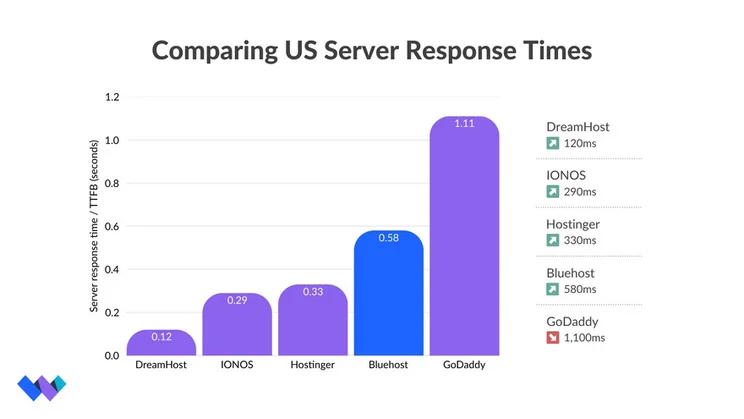
If you’re after the fastest web host, DreamHost and IONOS are good Bluehost alternatives. Based on our tests, both have great server response times, especially in the US, and DreamHost offers a 100% uptime guarantee (meaning you’ll be compensated for any downtime). Bluehost’s 99.99% uptime guarantee could translate to roughly four minutes of downtime per month.
How Can You Contact Bluehost for Support?
Bluehost has the best customer support options of any web host, offering 24/7 help across a variety of channels:
- Phone
- Live chat
- Knowledge Base full of educational resources, guides, and FAQs
- WordPress Support Services – you can pay for additional design support for your WordPress site
- Social media – Facebook, X, YouTube, LinkedIn, Pinterest, and Instagram
Other web hosts, like DreamHost, operate a callback system, so Bluehost’s 24/7 phone support can help you triage and solve problems instantly. For small businesses, this is critical when downtime costs can exceed $1,000 per hour.
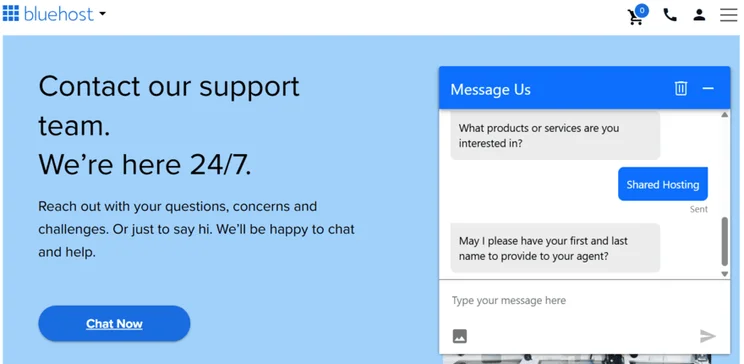
Phone support is not included in Bluehost’s cheapest Starter plan. You’ll need to upgrade to at least the Business plan to get this perk.
Should You Choose Bluehost or Another Web Host?
Following our tests, Bluehost can’t be beat when it comes to built-in hosting features (such as security measures), customer support options, and WordPress integration.
However, the web host you choose will depend on your personal or business needs, so I’ve highlighted where other web hosts excel below:
- For cheaper prices: Bluehost has decent introductory rates, but IONOS’ $1 deal is great for initial savings, while Hostinger’s $1.99/month plan offers long-term value since you’re locked into the low rate for a four-year subscription
- For local businesses: DreamHost has the fastest US server response times, which is ideal if you’re only targeting a local customer base
- For convenience: GoDaddy is a great option for ease, since you can use its website builder, domain registrar, and hosting services from a single dashboard (but it’s not as responsive or affordable)
- For larger storage: While Bluehost is a great option for storage space, IONOS’ plans are incredibly scalable and eventually offer unlimited storage
Bluehost was acquired by its parent company in 2011, known as Newfold Digital (formerly EIG). Unfortunately, the reputation for Newfold Digital is rocky – I’ve found plenty of complaints online, particularly on Reddit, with customers calling out upselling, DNS resets, and poor customer service.
That said, Bluehost does have a high 4.6 out of 5 rating on Trustpilot, with over 28,000 reviews.
Based on our testing, Bluehost does have steep renewal fees (which we’ve labelled clearly) and there are optional paid extras to consider as well. That said, we do think Bluehost’s WordPress optimized plans, 24/7 phone support, and scalability make it a formidable web host.
Bluehost Review: Our Final Thoughts
Overall, Bluehost is a reliable and highly-powered web host. With its range of hosting types, built-in features, and support options, it’s a great choice for beginners, growing businesses, and advanced professionals.
That said, because of Bluehost’s relationship with WordPress and specialized tools, it’s our preferred hosting provider if you’ve built a website with WordPress.


1 reply
1 reply
1 reply
1 reply